• Using Supervisor Mode in FeedLand

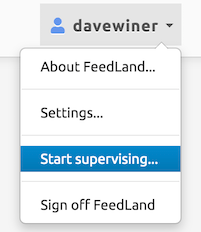
    If are an admin user, the UI of FeedLand will have a new command in the System menu, the menu at the right edge of the screen. If you are not an admin user, you won’t see this command.

    Initially, the command will be Start Supervising.

    When you choose Start Supervising, a dialog appears asking for the screenname of the user you want to supervise. If you enter the name of an actual user, the name in the upper right corner will change to the name of that user, and appear in green, so you know you’re in Supervisor Mode for that user. In that mode, everything you do in FeedLand should be exactly as the other user would see it if they were using the product.

    If you want to test it, try the Settings command, also in the System menu, change a value, click OK, and reload the page, and reopen the Settings dialog to be sure the changed version appears. You should probably switch it back to the original value, since this was just a test.

    When you want to stop supervising, choose the Stop Supervising command from the System menu. A confirming dialog appears, if you click OK you leave Supervisor Mode and return to your own account.

    To turn someone into an admin user, you must (at this time) have the ability to enter a MySQL command to change the role of the user. I’ve included a one-line command that does this in the docs for this upate.

  • WordPress signin for FeedLand

    The announcement and howto on the FeedLand support repo.

    A short post about why centralized identity is so important.

  • Transitioning to WordPress identity

    In the next release of the FeedLand server software, you will be able to log in using a WordPress account.

    A few facts about this new feature.

    • It’s not installed yet on either server.
    • I want it to (eventually) be the only way to log in to the A8C server.
    • On feedland.org it will be an option. Email registration will still work.
    • A WordPress-based account uses your WordPress username with a “wp-” added to the beginning to be sure there are no collisions with existing accounts created by email. Both servers need this transition but at some point we’ll decommission the A8C accounts created with email.
    • Email addresses must be unique too. I worked around this by changing my WordPress email address to davewiner@gmail.com, which for the purpose of identity is different from dave.winer@gmail.com, yet still represents the same Gmail mailbox.
    • I will be wp-scripting on FeedLand because I am scripting on WordPress.
    • It’s fewer steps for the users. Choose a command from a menu, you’re taken to wordpress.com and click the button to accept, and are redirected back to FeedLand, logged in. You also don’t have to come up with a screenname, that comes from your WordPress account.
    • It has a marketing advantage, less resistance perhaps from WP users, to a service being offered from Automattic. Also coincidentally encourages other developers to use WP login, plants a seed, and perhaps we’ll get storage along with it, and that’ll make lots of new kinds of writing tools to pop up for WordPress. (Something I want to be involved with btw, when it happens, as you can tell.)

    I still want to do some tuning up, adding prefs, writing docs, etc before putting the new version on NPM.

    PS: I started a thread on this in the new support repo.

  • Reading lists revealed

    The new UI for reading lists is topped off and the fixes are installed on the server, so now here are some links that show you around the new stuff.

    1. Here’s the info page for my first test list, which I just subscribed to on the A8C server.
    2. If you click on my name in the list of subscribers, you should see the list of all the reading lists I subscribe to.
    3. This is the info page for the art feeds list.
    4. Click on the river link to see all the recent news items from feeds in the list.
    5. Back up and click on the feed list link to see all the feeds in the list.

    Everything is very fast!

  • Filling out reading lists

    I am glad to be working on user interface for reading lists, and out of the feedlanddatabase boiler room.

    Fixing bugs, smoothing things out in the API, and making the Info page for reading lists work, providing ways to see:

    1. A timeline of all news from feeds in the reading list.

    2. See the feed list for the reading list in the standard FeedLand feed list viewer.

    3. See who else is subscribed to the reading list, and be able to see their collection of reading lists.

    In other words, it’s analogous to the browsing facilities we have for feeds. It’s another whole FeedLand. Not surprising it’s taken most of October to deliver. But trust me, it’s worth it. It’s what makes this mofo a platform, for real. It’s a real advancement in the art of feed management, imho.

    Also, on Friday we added depth to the Cats menu, where we can now see either the feed list for the category, or see the timeline for the category.

    All of this was made easier because FeedLand already had the connections for all of these data types in the feed list viewer and the river viewer. In this way it’s a fairly mature piece of software.

    Current status

    I have all this running on my local server, and when I top it off I will install it on feedland.org.

    When ready we will install the new server software on a8c.feedland.org, the server running on VIP.

    At this point I’ve got all the deliverables from the status outline working. 🙂

    Screen shot

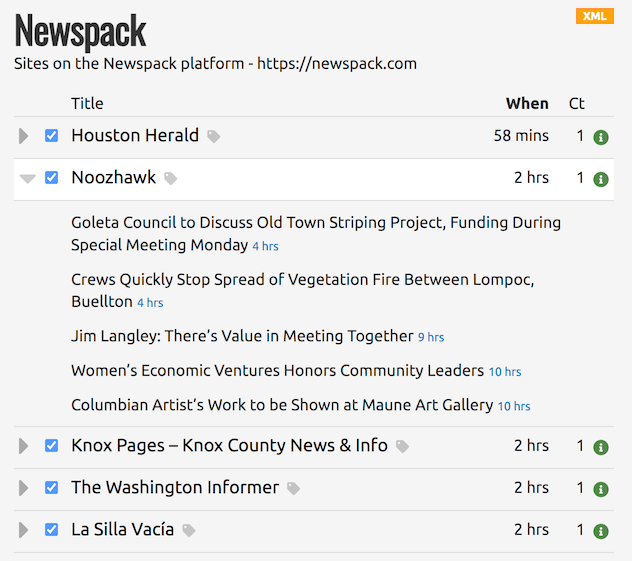
    The Newspack reading list as viewed as a feed list.

  • Top-level update of the FeedLand/Automattic project

    This started out being a private update for Matt, but I decided it should be part of the record for the project, keeping in the spirit of how these things go, on the web and at A8C.

    The development project

    Adapting FeedLand to run on the VIP service, which is capable of serving millions of users, is the first time I’ve created software that runs at this scale.

    In doing this work, I’ve gotten to know more about Automattic of course, and the more I learn the more I respect the company. It has a strong engineering culture, deep respect for users, other developers, and the open web. It’s probably the only company in the tech world that I could work with, at this time, on the kinds of projects I do.

    The development has been interesting and challenging. I’ve never created a server product that runs at this scale, but it all makes sense. You can’t store data in memory or on local storage, you have to use SQL or static storage on S3. We’ve got almost all the core features in now at the database level, still a few more to go. I can’t believe how fast it runs in the VIP environment. At first there were some bottlenecks but Chris and Fernando were able to tune it up so that it runs amazingly fast.

    We still have a lot of smoothing out to do, in the UI, and a few features left to implement for support (WordPress signin and Support Mode), but we can do that while people are using the system.

    Making news a platform

    The goal with FeedLand has been to make news a platform.

    The products you make with that platform are news sites, or for WordPress, services within sites. A new feature to sell existing customers, one no one else offers. A way to extend their reach into their community with bloggers, and connections to other news orgs whose coverage is complementary.

    The idea is that news has been a standalone thing, few connections between news orgs, or groups of bloggers, all that energy went into social media apps, and they were dominated by the big pubs. No surprise really, just lots of confusion.

    The feeds ecosystem and Automattic

    The big picture is that I’m setting up shop to restart development on the feeds ecosystem and economy, where we left off 1.5 decades ago, and we’ll do it first with the products in Automattic. Same way I did it in the 00s with UserLand products and Scripting News. We can move forward because we had all the pieces, content production, reading and content itself. We could innovate without getting permission. Today’s Automattic is incredibly well positioned to do this, and you’ve organized the company, and given me help from experts. It’s starting to work as I hoped it would.

    As I’ve learned about your organization I’ve seen opportunities everywhere. Christie and Chuck are leading us. Also with Pocketcast, for editing lists of feeds on the desktop so you can arrange your subs where you have all the info on the web, for remote listening. This imho has been a missing feature in podcasting since the beginning.

    So we start with the ecosystem that Automattic is, use that to launch into the news and developer worlds. Creating products for new ways to distribute news that take into account all the changes and opportunities that the web has created.

    Embracing the new role of social media

    I see tremendous opportunity now that the social media world is reorganizing, and many of the products support feeds or are open enough so that support has been added by developers, notably Mastodon and BlueSky. It’s a good time for innovation, creating new APIs and products, to make news more useful to more people, and to help foster growth in blogging and journalism, and to foster a new developer community for news products.

    Writing about this project publicly

    I’m getting ready to write about this project on my blog. Nothing but good things to say about the work we’ve done so far with the Automattic people.
  • I used the Indiana Jones method

    In programming and other things sometimes you get so involved in an elegant way of doing something and it isn’t working out that well, so you just take a gun out and shoot the problem like Indiana Jones did.

    That’s what I ended up doing with the hangup with reading lists I wrote up yesterday.

    The right solution is what I outlined there. The other right solution is what I did after restoring to a backup I took this morning, basically unwinding all the elegant stuff and and solving the problem in the one place it came up, and to hell with the rest of it.

    The problem was I needed the categories for new items I’m adding because I subscribed to a reading list. When it was first added to the database I didn’t take note of them because there was no place to save them.

    But the data I need is in the outline, and I know where it is — so I read it for each new user that subscribes, and build a table of categories, and look up in the table when I need the categories the feed is in according to the list.

    It adds a small fraction of a second to subscribing to a list. If that ever becomes a problem we can cache it separately.

    The problem with the really right solution is that it was too far-reaching, and some of the code that needed to be modified was really tight and carefully written and I made a mistake somewhere in there, and I wasn’t into trying to figure out how it really should work, because it was too freaking hard and I was tired. 😀

    Tomorrow I will work on user interfaces. I will drink coffee and be happy and glad to have this behind me.

  • The hangup with reading lists

    Add another week to implementation of reading lists, not at all surprising. 😉

    Here’s what’s going on for the developers among us and also those who want to peer into the Fog of Development. From my worknotes outline, pardon punctuation and capitalization.

    i had written code that subscribes all users to new feeds and unsubs from gone feeds, but i didn’t write code that subscribes a new user to all the feeds. now i’ve written it, and i find there’s another bit that i need that this new code needs, we remember the urls of the feeds in the list in json in the reading list record, but we don’t remember the categories each subscription is in. so when we boot up a new user in a reading list, we don’t know what categories to assign

    the solution is to go back to where we read the OPML at the beginning, and save all the atts on each subscription, never know what might be needed, and i don’t want to do this retooling again.

    there are several places where we convert the feedUrls json text to a list of urls, because of another historical fix here, some of that is happening in the client, have to do it because i’m only updating feedland.org while doing this development.

    this change is designed so as not to require a change to the database schema.

    i need a whole session to do this, so i’ll do it first thing tomorrow morning.

    i’m pretty confident (ha!) at this point that i’ll be able to proceed to work on the reading list info page, which will tie all the reading list ops together the way the feed info page does for feeds.

    comparatively the other work on the list seems easy, but we’ll see when we get there

  • What is a reading list?

    A reading list is a list of feeds you can subscribe to.

    The author of the list can add or remove feeds. When they do, people who subscribe to the list get the update, and are subscribed to the new feeds and unsubbed from the ones that leave.

    It means that there can be lots of specialized software that reads feeds, and the user gets to broadcast their subscriptions to all of them.

    It also means that influencers like Hickey can keep his community up to date on the podcasts he loves.

  • PocketCast and reading lists?

    I just added a new section to my Automattic project outline — Ideas, and added an idea (of course).

    It would be so cool if PocketCast supported reading lists, so I could manage my podcast subscriptions from my desktop.

    What got me going is a recommendation by my favorite podcaster Andrew Hickey of a podcast he loves. For me that’s an automatic subscription.

    And then it struck me that I want to manage my subscriptions from my desktop. I pretty much want to manage everything on my phone from my desktop. This would be a great place to start.