• Working on Reading lists

    For the next few days I’ll be working on getting reading lists working in FeedLand.

    I’ve been using lots of different terminology for this, now settling on reading lists because that’s the consistent name for this feature we’ve been using for years.

    We must have this feature in conjunction that that work I want to do with Chuck to smooth out the stack, and provide excellent ways for writers and developers to create off the News Product foundation.

    Separating the curating of feed lists from the presentation of the product is as essential as factoring components of software into packages that can be reused.

    More notes coming in the working repo.

  • Weekend dev notes

    As I did last week, I’ll post links here to topics of interest.

  • The ‘Cats’ menu (new feature)

    New in feedLandHome v0.5.6.

    • New Cats menu lists all the categories you have defined in the Settings command.
    • Select an item in the menu, to go to the Feed List page for that category.
    • The main headline on that page will have a new > element, the category name that you’re viewing.
    • The category that you have chosen has a checkmark next to its name in the Cats menu.
    • The tool tip for each Tag icon on a Feed List page now shows the categories that feed has been assigned to.
    • These changes are in version 0.5.6 of feedlandHome (the client app, runs in the browser, not on the server). Look in the upper right corner of the menu to confirm you have the latest version.

    Example

    Here’s a link to my Podcasts list.

  • Reading the source in outline form

    I write all my source code in outline form, using Frontier, and generate files of JavaScript, HTML and Markdown from the outline. It makes it easier for me to develop complex applications without the complexity getting in the way, and also to fully document the code in the code itself without making it harder to read. There are other more esoteric advantages, but I’m not trying to sell you on editing in an outliner, rather if you want to learn how FeedLand works inside, at some point you’re going ot have to read the code in outline form.

    Why read the outline version?

    • Outline comments, many of which are very long, don’t make it out into the generated JS code.
    • Easier to follow the incredibly long nested callbacks.
    • I believe you’ll better see how the pieces fit together.

    Start with database.js

    I recommend starting with database.js, the lowest level of FeedLand.

    This link will open database.js in read-only mode in Drummer.

    The same method works for any source.opml file in any of the repos.

     I recommend opening tabs for each of the packages you care about, and when you want the latest versions of the source, just reload drummer.land.

  • FeedLand docs in Markdown

    Good morning!

    The new version of the FeedLand user docs is now available in first rough release. I still want to go through every page, slowly and carefully, to make sure the info is correct, and to consider things that may need explanation that aren’t well explained.

    Who the docs are for

    1. Team members. These docs are meant to be an aid to testing and supporting the product. If you’ll be involved in the project going forward, you should be familiar with all the features. And on the flipside, any missing features should be added to the docs, so that the next people to come along have a good menu of things to learn about and/or review.
    2. Users. Also some users do actually read the docs. I like it when products explain themselves well. So I’ve strived to make docs that are human-readable and useful technical resources.

    Pointers

    This is where you read the docs (a temporary address).

    This is where the source of the docs is.

    Where you can post comments, questions, suggestions, additions, etc.

    Let’s have fun! 🙂

  • Next issues with a8c.feedland.org

    I have a FL icon in my browser window, the second one after Gmail, and now it points at the A8C instance, not feedland.org. I’m going to try to make this my main feedland. I think at this point it may be possible to do this, after the recent fixes.

    What domain name to use?

    I posted this a week or so ago on Slack, and today I figured out what a good first cut at the name would be: feedland.automattic.com. It matches the email address we use for confirmations, and I think it very clearly says what this server is. We’re booting up FeedLand at Automattic.

    FeedLand docs converted to Markdown

    To prepare for a future where hopefully lots of people are contributing to the user docs for FeedLand, I’ve converted them to Markdown, and they’re now in the docs folder on the a8c-FeedLand-Support repo, which is still currently private. If you’re at A8C and want to get involved, please let me know and I’ll authorize you for the site.

    Here’s a link to the Getting Started document.

    Still more work to do here.

    New version of FeedLand server

    Hooks up the new way of finding updated items to the river cache, so we can turn an config.flUseRiverCache back on, for better performance for users like me. 🙂

    Update note here.

    New features considered

    I’ve written up two new ideas for features.

    1. Dynamic subscription lists.
    2. myTitle and myDescription for feeds. (Low-tech approach described.)
    3. Fixed keyboard problem in Feed List.
    4. Viewing a feed list with only one category.
    5. Video demo of Feed List page as a feed reader.

    Removed items

    I had two items here, one about wanting to review how we do static storage, and the other of very long delays in page loading, but I have new thinking on static storage (I guess I did the review myself) and the delays were probably due to connectivity where I’m working, so unless they reappear, I’m not concerned. There was an update (see below) that allows us to start caching rivers again on the A8C server, which will give the service an important performance boost.

  • Why WP-Projects is so important

    Yesterday I posted an item here on the FeedLand blog about the WP-Projects news product at wpprojects.feedland.dev.

    Today I’d like to explain what the wpprojects list is, from my point of view, and why it is so unique and important and imho visionary.

    You can download the list itself in OPML by clicking on the orange XML icon at the top of the page. This is provided automatically by FeedLand, it’s something we do with all our lists, although it’s possible to hide it.

    What it is. It’s a list of projects that Automattic has undertaken with partners, some individuals, some groups, who they wanted to work with. The sites show people how WordPress can be used, and showcase the latest techniques for design.

    Why it is unique. I’ve been evangelizing the use of “rivers” of news for communities as a way to encourage more people to blog, to get more ideas and information flowing around a topic. I think all kinds of organizations should host rivers for people in their communities, universities, companies, local groups and of course news organizations. But it’s always hard to get these groups of blogs started. It’s a chicken and egg thing. Once you have a river up and running, people will want to read it, will want to belong to it, and will start new blogs to share perspectives that they have. But getting it started, that’s a lot harder than you might think.

    When I moved back to NYC in 2010, into an apartment in the East Village, I thought since this is a cultural center, and blogging was super hot then, there must be a lot of blogs here. There were three. One of them EV Grieve is still running, and while they were updating a few times during the day, the combined flow of the blogs wasn’t enough to make an interesting river.

    For years, I’ve been looking for a good example of a set of feeds that would demo the idea that I thought would catch on if there were just a good example to emulate. And that’s where wpprojects comes in.

    Automattic had the vision I was hoping all organizations would have. They make a super popular blogging platform, so it’s totally in their interest to help people get their ideas out there. wp-projects provides good examples, and it helps their people have real practical experience with top creative people, which in turn will go back into the product, benefiting all users.

    And it also provides the best example yet of a river of news that can be easily turned into a news product (as we have) and we should study it, develop it, learn from it, and most important when we’re ready, share it with the wpprojects people themselves, and seek their feature requests and design ideas. The river should be as thoughtfully presented as the wpprojects sites themselves.

    Our project has been blessed with a ready-made community that can, if we’re lucky, help guide the development of FeedLand, for the purpose of building and sharing the idea of communities of bloggers, via News Products.
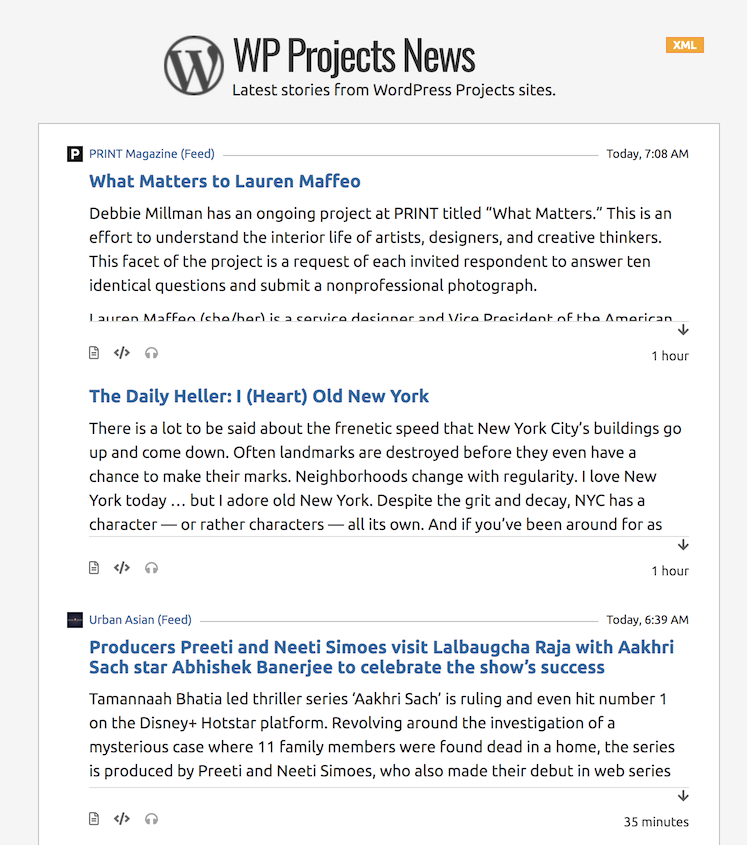
  • WP-Projects on FeedLand

    This is the most useful and imho amazing News Product site so far on FeedLand. It may ultimately be the one that proved the concept, once and for all. It’s that momentous, of course, imho, ymmv etc.

    https://wpprojects.feedland.dev/

    It’s a reverse chronologic list of new posts written by people who Automattic works with.

    How to use it

    Bookmark it and visit it periodically. I’ve found that once a day is usually enough to keep up with the new stuff.

    Here’s a screen shot taken on the day this post was written.

    What it demonstrates

    • Collections of news feeds are important.
    • Automattic has decided in each case to support these people and groups. People who are accomplished in their fields with the potential to contribute more. Their expertise and ideas are important to them.
    • They want to share their work not only with people who work at Automattic but other partners, and users, and the general public.
    • These sites illustrate what can be done with WordPress, a product that they are justifiably proud of. Best practices of the technology, writing and thinking. Innovation.

    How this idea grows

    Every news organization should have a similar site, with posts by experts and journalists who they want to keep up with. First as an internal resource, then as something they share with readers and their competitors. It’s a way of bringing the world of ideas and expertise into their publication.

    What is FeedLand?

    It’s a feed management system, a way for people to share feeds with people others, adopting many of the ideas of social media and applying them to feed reading and writing.

    FeedLand was written by me, Dave Winer — who developed the first blogging, feed reading and podcasting software. Dave (me) feels that there’s a lot more to do with RSS and related technologies. FeedLand is a fresh start.

     I’ve been working with Automattic in 2023 on this project, and others. 😀

  • Next steps after memory problem fixed

    Fernando has fixed the caching problem and now the test for the memory fix function returns a good result. So here’s the plan now that we’ve passed this hurdle

    1. I’m working on something related to News Products that I want to show, hopefully later today.
    2. After that is delivered, I will switch over to testing the Settings command and getting that to work properly.
    3. In the meantime, Fernando should be thinking of ways to test the foundation of the product, as we discussed on Friday, perhaps using the test functions that call into the API.
    4. I’ve also been thinking about ways you might write your own debugging code to test the API from your desktop. I think this test function really worked. It’s a very concise way to write a bug report.
    5. We still have to prove that the basic functions of FeedLand work on A8C. Once we have that we’ll be able to test higher level stuff with more confidence.
  • Adding storage to WordPress

    This is not strictly about FeedLand.

    Suppose I have an idea for an editor for WordPress posts.

    I have a constraint, the editor can’t save any information about the post that isn’t in the HTML code for the post.

    This severely limits the kinds of editors developers can write.

    Instead if WordPress had the idea that an app could store some JSON data along with a post, and when the user wanted to edit the post they would get the data back, we could edit all kinds of structures and have the result available in WP, not just to us, but to every app they give permission to.

    I’ve wanted this feature for WP for a long time.

    Maybe it’s already there? It has happened before that I’ve asked for a feature in a product that was already there. 🙂

    I first saw this idea in the early Mac OS…

    BTW, this idea goes back to the early Macintosh OS. Every object in the system had a 32-bit refcon which could be anything the app wanted it to be. Usually it was a pointer to an object that contained a lot of data and more pointers. You could attach them to a window, a menu, a button in a dialog, iirc every object had a refcon. Whole complex systems were built around this idea. It meant that the platform vendor (Apple) could evolve their internal structures without breaking developers.